Backup & recovery
Volume and partition image backup and restore paths. Backup integrity checking and a successful boot after restoration are separate validation steps.
Restoring can affect existing data on the target.
ITNCONNECT software for managing Windows PCs in industrial, equipment and inspection environments, understanding faults and preparing recovery.
Bring device, driver, storage and backup information into one place and connect the workflows needed for Windows management.
The product is presented as Windows Manager Pro; the application name is WinManagerPro. Availability depends on the Windows edition, device configuration and Pro/Max tier.
The reviewed product documentation identifies 1.0.0-rc.5. The descriptions cover documented implementation scope, not successful operation on every device or completion of all recovery validation.
Each capability is paired with its purpose and operating conditions.
Volume and partition image backup and restore paths. Backup integrity checking and a successful boot after restoration are separate validation steps.
Restoring can affect existing data on the target.
Windows boot configuration data (BCD) and recovery boot paths. Review the target Windows installation, EFI partition and boot mode before selecting a recovery procedure.
Procedures depend on UEFI/BIOS, GPT/MBR and encryption state.
An implementation for two-disk mirroring and status inspection using Windows Storage Spaces. Its configuration differs from hardware RAID.
Eligible data disks are required. Mirroring does not replace an independent backup.
Inspect device IDs, driver versions and problem states; search Windows Update candidates and download/install a selected candidate. Hardware ID-based Catalog search can help when no candidate is available.
Availability depends on connectivity, update policies, vendors and devices. Post-reboot checks may be required.
Workflows for Windows installation USB media and WinPE recovery environments. Creating a new WinPE image requires Windows ADK and the WinPE Add-on.
USB initialization erases data. Confirm image licensing and boot compatibility for the target device.
A management interface for folder baseline recovery, UWF on supported Windows editions, CPU/memory/disk status and hardware information.
Protection features such as UWF depend on the Windows edition and configuration.
Based on the tier policy in the current product README. Confirm current feature and activation terms before supply.
| Scope | Pro | Max |
|---|---|---|
| License model | Default tier without a key | Perpetual entitlement on the activated device after a valid key is activated |
| Protection, drivers, monitoring & hardware | Shared features | Shared features |
| Image backup/restore, boot USB & storage | Shared features | Shared features |
| One-click recovery & recovery boot | Max-only features excluded | Additional features, subject to environment requirements |
Included features still require compatible OS, disks, recovery images and individual validation. Perpetual entitlement does not imply unconditional access to all future versions or services.
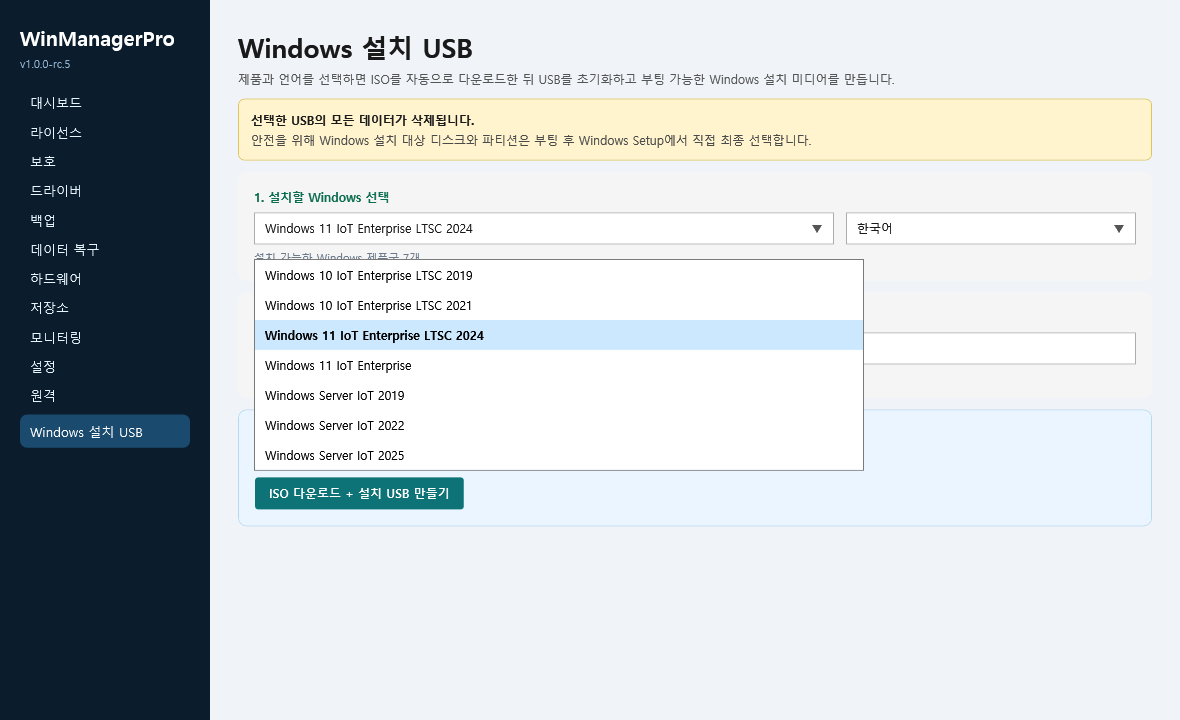
Available captures include their date and context. Reserved spaces for additional captures are labelled as awaiting images.
 View original ↗
Product capture dated 26 September 2026 · Edition and language selection. Visible options do not establish OS support, licensing or physical USB validation.
Reserved for backup selection, progress and recovery result captures.
Reserved for device status and driver search captures.
Reserved for mirror configuration and system monitoring captures.
Implementation, individual tests, end-to-end recovery validation and release status are distinct.
Backup creation and integrity checks alone do not prove recovery. Validation must cover WinPE boot, actual restoration and an isolated boot of the restored Windows system. Product documentation retains this end-to-end gate as a release requirement, so it is not marked complete.
Restore, BCD changes, mirroring and USB initialization can affect data and bootability. Identify the target disk, keep an independent backup, check encryption and recovery keys, and prepare a recovery plan. Validate in a representative environment before applying changes to production equipment.
The management UI is separated from the Windows service that performs privileged work. Confirm administrative permissions, package/update signatures and sensitive-log handling for the deployed version. No security certification or elimination of all risks is claimed.
A proposed architecture where Claude API explains Windows Manager Pro state, logs and support documentation. This page does not indicate an implemented API integration or completed in-product AI capability.
Planned analysis of event, backup and recovery logs, error codes and system state to explain possible causes and further checks. This does not establish a definitive cause or guarantee recovery.
Under review: explain data impact, target checks and stop conditions before restore, BCD changes, cloning, RAID configuration or USB initialization. Actual changes require product checks and user approval.
Explain documented steps, data impact and stop conditions for BCD, boot and backup issues.
Translate device IDs, versions and device state into readable guidance. Downloads remain subject to official sources and product checks.
Map questions such as “Windows will not boot after recovery” to relevant diagnostics and a check sequence.
Prepare inquiry summaries from user-selected system information and logs, and assist support staff in drafting replies.
Design principles: let users review and consent to selected logs; keep API keys on the server and disclose transmission/retention policies. AI explains possible causes and procedures; disk, BCD and driver changes remain subject to product checks and user decisions.